
VPN Meaning: What “Virtual Private Network” Really Promises
- “Virtual” Means the Private Route Isn't a Private Cable
- “Private” Describes a Boundary, Not Invisibility
- “Network” Means Endpoints, Routes, and Shared Resources
- A Work VPN and a Privacy VPN Aren't Interchangeable
- The App Creates an Interface, Then a Routing Rule
- The Server's IP Is a Mask for the Route, Not the Person
- A VPN Label Isn't a Quality Certificate
- The Terms Beside VPN Matter More Than the Slogan
- Keep the Definition—and Its Boundary
VPN means virtual private network. Three ordinary words carry one very specific promise: a private route built through a larger network. They don't promise invisibility. They don't promise that every app, server, or company wearing the VPN label deserves your trust.
Open a laptop on airport Wi-Fi without a VPN.
The airport network carries each connection toward its destination. HTTPS may protect page contents in transit, but the network can still see useful connection metadata and destination IPs. A website sees the airport's public IP plus the account, browser, and anything submitted.
Now turn on a full-device consumer VPN.
The operating system feeds covered traffic into an encrypted connection to a VPN server. The airport sees that tunnel, its timing, and its volume. The VPN provider receives the source connection and can observe forwarded destination IPs, while HTTPS still protects supported contents from that intermediary. The website sees the server's public IP—and still sees the account, browser, and submitted information.
That is the acronym in motion.
“Virtual” Means the Private Route Isn't a Private Cable
No dedicated wire suddenly stretches from the laptop to a server in another city. Software creates a logical interface, agrees on keys and protocol details with the remote endpoint, and carries protected packets across the same internet infrastructure everyone else uses.
The route exists because both ends treat it as a connection. Tap Disconnect and it disappears. Choose another server and the endpoint moves without moving the laptop.
Virtual doesn't mean imaginary. It means the separation is created in software rather than by laying a physical cable for one user.
That distinction also explains why failure matters. The ordinary internet route is still underneath. If the VPN drops and no kill switch blocks fallback, traffic can return to that ordinary route before the app reconnects.

“Private” Describes a Boundary, Not Invisibility
Private is the most overworked word in the name.
In networking, it points to a logically separated route or set of resources with controlled access. It doesn't mean nobody can observe anything. It doesn't guarantee a perfect privacy policy, and the word alone doesn't specify an encryption algorithm.
Consumer VPN services normally encrypt traffic between the device and their server. That keeps the airport in the opening from seeing the same destinations and contents along that segment. The airport still sees a connection to the VPN server, while the VPN company now occupies the privileged position at the other end.
After traffic leaves the server, HTTPS remains important. It can protect supported web contents in transit, but the destination can read what is deliberately sent to it. Sign into an account and the site knows the account even though the IP changed.
Privacy moved. It didn't become invisibility.

- Sits on a wired network as a dedicated gateway for OpenVPN or WireGuard traffic
- Can run VPN client and server roles together for remote access and protected outbound browsing
- Has no Wi-Fi radio, making it best for pairing with an existing router or access point
A wired gateway such as the Brume 2 makes the idea tangible. Devices can send selected traffic through one VPN endpoint before reaching the internet. The box isn't privacy by itself: it needs a configured provider or remote server, a deliberate routing policy, and another router or access point if Wi-Fi is required.
“Network” Means Endpoints, Routes, and Shared Resources
A network lets devices exchange data and reach resources. A VPN builds that logical network on top of another network.
The endpoints change with the job.
For a remote employee, one endpoint may be a company-managed laptop and the other an office gateway. The tunnel carries authorized work traffic toward private files, internal dashboards, or systems that aren't open to the public internet.
For a consumer VPN, one endpoint is the app or router and the other is the provider's server. The provider usually routes covered traffic onward to the public internet, so destinations see its public IP.
Same core idea. Different destination and trust model.
Supporting systems count too. The service may authenticate the account, assign addresses, answer DNS requests, select servers, collect diagnostics, and process payments. Those systems affect privacy and reliability even when the Connect screen says nothing about them.
A Work VPN and a Privacy VPN Aren't Interchangeable
The shared acronym causes a predictable mistake.
A work VPN is usually designed to identify the employee and connect that person to organization-controlled resources. The employer may log sessions, inspect supported traffic, and enforce device policy. Hiding from the company isn't the goal.
A consumer privacy VPN is usually designed to place a provider-operated server between the device and public destinations. It can reduce what the local ISP sees and replace the public IP seen by sites. The VPN company becomes a new intermediary that must be evaluated.
Compare every observer.
On the work tunnel, the local network sees the encrypted gateway connection, the employer operates the next hop, and the internal service sees an authorized company route plus the employee's account. On the consumer tunnel, the local network sees the provider connection, the provider operates the next hop, and the public site sees the provider IP plus whatever account and browser signals arrive.
Calling both “VPN” describes the network pattern. It doesn't make their purposes equal.
The App Creates an Interface, Then a Routing Rule
When a VPN connects, the operating system typically gets a logical network interface. The client negotiates an encrypted session with the server and installs routes telling selected traffic where to go.
In a full-tunnel setup, most ordinary internet traffic uses that protected route. In split tunneling, chosen apps, sites, or networks may take another path.
Follow both.
The included browser enters the tunnel. The local network sees the VPN connection, the provider forwards the browser traffic, and the website sees the VPN public IP. An excluded music app goes direct. The local network sees that service connection, the VPN provider receives none of it, and the service sees the ordinary public IP.
One green icon can sit above two routes. That's why “the VPN is on” isn't a complete test.
Google's Android Enterprise guidance, for example, separates always-on VPN behavior from the option to block connections that don't use the VPN. Configuration—not the acronym—decides the boundary.
The Server's IP Is a Mask for the Route, Not the Person
Websites normally receive the VPN server's public IP instead of the address assigned to the home, office, hotel, or phone connection. That may change an IP-based location estimate and keep the normal address away from the destination.
It doesn't remove cookies, logins, browser fingerprints, GPS permission, payment records, or personal details typed into a form. A shared server address can mix many customers behind one visible source, but the people don't become indistinguishable everywhere else.
The phrase “hide your IP” is therefore true and incomplete. It hides one address from a particular destination on a covered route. The device knows the original connection. The local provider knows which subscriber connected. The VPN provider receives the source connection. The website still gets its own set of clues.
Use the narrower claim. It's more useful because it can be tested.
A VPN Label Isn't a Quality Certificate
An app can call itself a VPN and still have weak maintenance, vague ownership, invasive analytics, poor routing, or a privacy policy full of exceptions.
The label doesn't guarantee a no-logs design. It doesn't prove the kill switch works during a handoff. It doesn't promise DNS and IPv6 take the intended route. It doesn't guarantee access to a streaming service, either.
Skip “military-grade encryption.” Look for named, current protocols; clear platform documentation; a specific data policy; reproducible leak tests; a kill switch with defined scope; and independent audits whose dates and boundaries you can read.
The U.K. National Cyber Security Centre's VPN guidance treats forced routing, split tunneling, captive portals, failure behavior, and configuration as real design choices. That's far more informative than a shield animation.
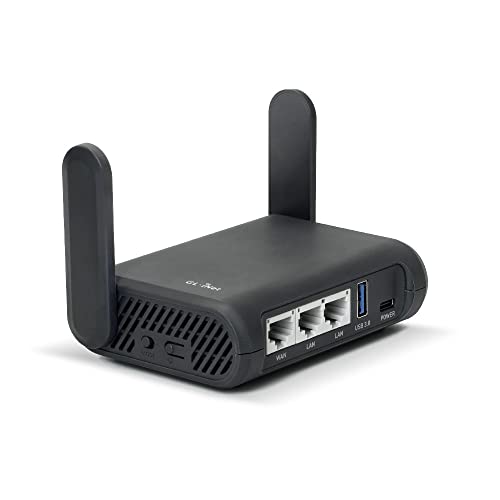
- Turns a wired or public wireless connection into a network shared by your own devices
- Includes WireGuard, OpenVPN, policy routing, and an optional VPN kill switch
- Runs OpenWrt and supports network storage, encrypted DNS, guest Wi-Fi, and AdGuard Home
A travel router can extend one VPN policy to televisions, tablets, or other devices that lack a suitable app. It can also make one bad fallback rule affect all of them. Check which clients use the tunnel, what happens when it fails, and whether a phone can silently switch to cellular outside the router.
The Terms Beside VPN Matter More Than the Slogan
A protocol is the set of rules used to create and maintain the protected connection. WireGuard, OpenVPN, and IKEv2/IPsec are common names, but support and behavior vary by platform.
A kill switch blocks covered traffic when the protected route fails. Split tunneling deliberately excludes some traffic. A DNS leak sends name lookups somewhere other than the intended resolver path. A no-logs policy describes what the provider says it doesn't retain.
Each term asks a testable question. Which traffic? Which failure? Which resolver? Which data? Which retention period?
Our VPN protocol guide explains the connection choices. The kill-switch guide shows how to test failure instead of trusting a label.
Keep the Definition—and Its Boundary
A VPN is a virtual private network: a logical private route built across another network. In the consumer version, the device usually encrypts covered traffic to a provider server, changing what the immediate network can observe and which public IP destinations see.
That's meaningful protection.
It isn't total anonymity, automatic device security, a trustworthy company, or guaranteed access to anything online. Those are separate claims with separate evidence.
Remember the airport. The VPN changed the route, the middleman, and the public IP. It didn't erase the laptop, account, browser, or person at either end. The acronym tells you how the traffic travels—not everything that happens when it arrives.