
Disney+ VPN: A New IP Doesn't Guarantee a New Catalog
A VPN can give Disney+ a different IP address. Disney+ can answer with Error 73. That's not failed encryption; it's the service rejecting the location signal or anonymized route. The reliable travel plan starts with supported viewing, not a server chase.
Jules opens Disney+ on hotel Wi-Fi and a show from home is missing. On the direct connection, the hotel network sees Disney+ traffic metadata while HTTPS protects the stream contents, and Disney+ sees the hotel's public IP plus Jules's account, device, and app information.
He turns on a full-device VPN. The hotel now sees an encrypted connection to the VPN server, the VPN provider becomes the intermediary, and Disney+ sees the server's public IP. Jules's account and device didn't move with it, and the app may use more than that one address to decide what it can show.
A different IP can change the result. It can't force Disney+ to accept the route.
Travel Changes the Catalog Before It Breaks the App
Disney+ says viewers traveling in supported places generally receive content available in the country or region they're in. A title from home may disappear because distribution rights, ratings, local offerings, plan rules, or law change across borders.
That missing title isn't automatically a VPN problem. Profile maturity settings, Junior Mode, live-event location rules, household status, and linked service credentials can also hide content. Check those before turning the network into a guessing game.
The current Disney+ availability guidance is the place to confirm where the service operates and what travelers should expect. Supported regions and home-country rules can change, so an old country list isn't a travel plan.
Some legal regions have portability rules that preserve more of a home catalog. Verify the current rule for your account and destination rather than assuming every border works the same way.

Error 73 Is a Diagnosis, Not a Dare
Disney+'s Error 73 instructions name two common causes: access from an unsupported country or region, and use of a VPN or IP anonymizer. The official fix is to disable that route, check the internet connection, restart the device, and relaunch the app.
Follow that order. Repeatedly changing VPN countries adds new servers, cached sessions, DNS routes, and app states to a problem you're trying to simplify.
If Disney+ works immediately on the ordinary connection, you've learned something useful: the account, app, and basic network can stream, while the VPN path triggers the failure. That doesn't reveal whether Disney+ recognized a shared server address, distrusted mismatched signals, or applied another control.
If it still fails with the VPN off, stop blaming the tunnel. The device may have stale location data, the service may be unavailable where you are, or the network's public IP may be mapped to the wrong region.
The VPN May Be Hiding in Another Box
Turning off one app doesn't prove the ordinary route is back. An antivirus bundle, browser extension, work profile, privacy relay, proxy, Smart DNS setting, or router can still change where Disney+ traffic goes.
Check the operating system for VPN and managed profiles. Inspect the browser for proxy extensions. On a television, fully close the Disney+ app rather than returning to the home screen, then inspect any native VPN app and the router policy controlling that device.
A travel router can carry several devices through one provider profile, which is useful when you mean to protect the whole hotel setup. It can also become the hidden reason a television keeps presenting a VPN exit IP after the phone app says disconnected. Know where the route begins before troubleshooting where it ends.
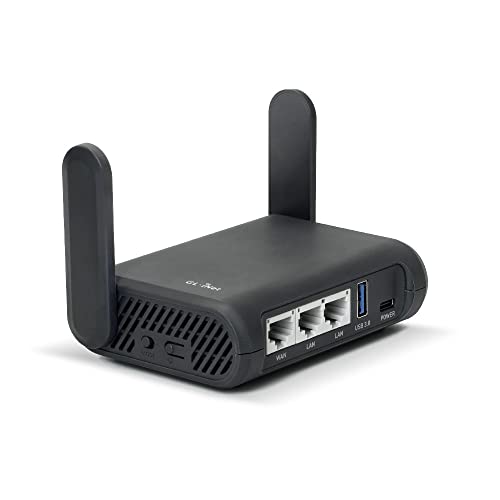
- Turns a wired or public wireless connection into a network shared by your own devices
- Includes WireGuard, OpenVPN, policy routing, and an optional VPN kill switch
- Runs OpenWrt and supports network storage, encrypted DNS, guest Wi-Fi, and AdGuard Home
Don't remove a managed profile from a work device. Use a personal device or ask the administrator which traffic is allowed outside the company route.
Fix the Wrong Location on the Plain Connection
Disconnect VPN, proxy, relay, and custom Smart DNS routes. Connect through the ordinary hotel, home, or mobile network, then check the public IP's reported country in a browser. IP-location databases are estimates, but a different country is a useful clue.
Confirm the device's time zone and location permissions. Some live or local content may need device location, so an IP check alone can't reproduce the app's full decision.
Power-cycle the modem and router if you're at home and the provider recently assigned a mislocated address. Fully close Disney+ before reopening it so old connections don't survive the network change.
If the problem remains, contact the internet provider and Disney+ support with the error code, device model, app version, connection type, timestamp, and public IP. Send the address privately to support; don't paste it into a public forum.
Downloads Beat a Fragile Server List
Disney+ recommends downloading eligible titles before travel. Its current download guidance limits downloads to supported mobile devices and eligible plans, and says availability can vary by title. Computers and TV-connected devices don't currently receive the same download option.
Download on a trusted home connection, then switch the device to airplane mode and play each title before packing. Don't log out afterward: Disney+ says that removes downloaded content. The device also needs to reconnect periodically, and some titles can expire or leave the service sooner.
Choose download quality with storage in mind. High quality helps on a large tablet but consumes more space; several tested medium-quality episodes are more useful than one unfinished high-quality movie.
Public charging is a separate travel decision. A charge-only adapter can physically remove the USB data path at an unfamiliar port; it doesn't affect Disney+ rights, account checks, or VPN routing.

- Turns a compatible USB-C connection into a power-only path by blocking data transfer
- Adds a compact barrier when charging from public ports, shared computers, or unfamiliar adapters
- Includes two units so privacy-conscious travelers can cover more than one cable kit
Split Tunneling Creates a Deliberate Exception
Suppose Disney+ works in the supported destination only after the VPN is disabled, but Jules wants other apps protected on hotel Wi-Fi. Split tunneling can send Disney+ outside the VPN while covered apps keep using it.
The comparison has two routes. Disney+ travels directly: the hotel network sees its connection metadata, and Disney+ sees the hotel's public IP. Covered email or browser traffic enters the encrypted tunnel: the hotel sees the VPN connection, the VPN provider occupies the intermediary position, and those destinations see the VPN exit IP.
That can be a reasonable compromise when the app and platform support a precise exception. It isn't “VPN protection for Disney+.” Disney+ is the traffic you deliberately removed from the tunnel.
Test the exception with an IP-capable app or provider documentation, because platform behavior differs. Remove it when the trip ends instead of leaving a forgotten bypass. Our split-tunneling guide shows how to reason about both routes.
If you're uncomfortable putting Disney+ directly on questionable Wi-Fi, use personal mobile data or another trusted connection. A streaming error isn't an instruction to weaken every other app.
A Catalog Isn't a Leak Test
Seeing the home catalog doesn't prove every connection entered the VPN. Disney+ can use account, cached, profile, household, and device information alongside network location. A successful stream also doesn't promise the same server will work tomorrow.
Use a separate IP and DNS test in a browser-capable environment to check the tunnel. Keep content availability and network routing as two different questions; the Disney+ screen can't answer both.
Disney+ may work while you travel in supported regions, but the available catalog can follow the destination rather than the living room you left. When Error 73 identifies a VPN or location issue, remove the anonymized route and restore a known-good connection. Prepare eligible downloads before departure, use a narrow split exception only when you understand it, and let the VPN handle the privacy traffic Disney+ actually permits through it.