
TunnelBear Review: The Friendly VPN Still Has to Prove Itself
TunnelBear makes a VPN feel like one switch and a cartoon bear. That's useful—until the tunnel drops, an essential site blocks the server, or a device can't run the app. The design lowers the learning curve. It doesn't lower the standard.
Open a laptop on airport Wi-Fi. Without TunnelBear, the network can see connection metadata and the services the laptop contacts, although HTTPS usually hides the page contents. The website sees the airport's public IP address and still sees anything you reveal through logins, cookies, or the browser itself.
Turn TunnelBear on. Covered traffic now travels through an encrypted connection to a TunnelBear server. The airport network sees that tunnel and its timing and volume, TunnelBear occupies the new middle position, and the website sees a TunnelBear IP alongside the same account and browser clues as before.
The bear changes the route. It doesn't make the people using it anonymous.
The Map Solves a Real Beginner Problem
A first VPN app can be surprisingly vague. Did it connect? Which country did it choose? Will it reconnect after the laptop wakes up? TunnelBear's map, obvious switch, and visible country answer the first two questions without asking the user to understand protocols.
That clarity is the service's strongest advantage. A new user can choose the fastest tunnel, watch the status change, visit an IP-check page, and see the route change in a few minutes.
The app also supports automatic connection behavior and unlimited devices on current plans.
The free account includes 2GB of data each month, while paid accounts remove the monthly data cap. That free allowance is enough for a compatibility test, not a month of ordinary video and browsing.
Easy controls don't prove reliable behavior, though.
Close the lid, move from home Wi-Fi to a phone hotspot, and wake the laptop again. If the app looks friendly but traffic quietly returns to the normal route, the part that mattered failed.

“No Logs” Still Needs the Rest of the Sentence
TunnelBear's privacy policy says it doesn't log visited websites, DNS queries, or traffic contents. It separately lists account and operational data such as an email address, app and operating-system versions, monthly activity and data totals, coarse geolocation, device information, and crash reports.
That distinction is useful. A service can avoid browsing logs and still hold data needed to run accounts, meter a free allowance, prevent abuse, and fix crashes. The right question isn't whether TunnelBear collects literally nothing. It can't run an account that way. The question is whether each retained field is necessary, narrowly used, and kept for a stated period.
TunnelBear is based in Canada and has been owned by McAfee since 2018. Neither fact proves good or bad privacy. They tell you which company and legal environment sit behind the app; the policy, system design, and outside testing tell you more about what that position can expose.

- Connects everyday data collection to real choices about freedom, power, and control
- Explains why privacy matters even when you have nothing to hide
- Turns a broad social issue into practical questions you can apply to your digital life
An Audit Is Evidence With an Expiry Date
TunnelBear helped make public VPN security assessments normal by commissioning recurring work from Cure53.
Its 2024 assessment examined applications, backend systems, server configurations, APIs, network entry points, and data-handling layers. The published account said the reported vulnerabilities were acknowledged, addressed, or mitigated.
That's stronger evidence than a badge saying “military-grade.”
It still isn't a permanent certificate. An audit covers a named scope during a particular period; the app, servers, dependencies, and operating systems keep changing afterward.
Use TunnelBear's current transparency and security material to find the newest report, its dates, what the testers could inspect, what they found, and which fixes were verified. If a later audit is only described as completed, don't pretend that description gives you the report's detail.
The honest reading is encouraging but limited: TunnelBear has a meaningful public security record. You should still inspect the newest evidence, not borrow confidence from the first audit in 2017.
The Cute Names Control Uncute Failures
VigilantBear is TunnelBear's kill switch. When an established tunnel is interrupted, it blocks unsecured traffic while the app reconnects. That can stop a website or background app from suddenly using the normal network and exposing the device's usual public IP.
Test the exact state you care about. Start a download, change Wi-Fi networks, suspend the device, wake it, and force the VPN process to stop. Watch whether internet access pauses and whether the tunnel returns before traffic resumes. TunnelBear warns that VigilantBear protects a connecting or interrupted tunnel; merely leaving the app open but disconnected isn't the same state.
SplitBear sends selected apps or websites outside the tunnel. The exception can fix a bank or local device that rejects VPN traffic, but it also restores the ordinary route for that exception. The local network sees that direct connection, the destination sees the normal public IP, and TunnelBear doesn't carry it. Covered apps keep the encrypted TunnelBear route.
SplitBear's controls aren't identical everywhere. Current support material describes app-and-website exclusions on Windows, website exclusions on macOS and iOS, and app exclusions on Android. Check the current behavior on your platform before copying instructions from another device.
GhostBear is obfuscation: it makes VPN traffic harder for a restrictive network to recognize and block. It may help a connection establish, but it can cost speed, isn't available on every current app version, and doesn't give permission to break local law or an employer's rules.
WireGuard, OpenVPN, and IKEv2 availability also varies by platform. Start with automatic selection. Change protocols only when you're testing a specific block, unstable connection, or performance problem—and change one thing at a time.
The Missing Devices May Decide the Review
TunnelBear supports Windows, macOS, Android, and iOS, plus browser extensions. Its device guidance describes limited Linux support and says it doesn't support Apple TV, Android TV, gaming systems, or manual modem and router configurations.
That boundary matters more than an impressive device count. One paid account may allow unlimited connections, yet it can't protect a television or console that has no supported app. And because TunnelBear doesn't provide router profiles, buying a VPN-capable router doesn't turn it into a whole-home TunnelBear solution.
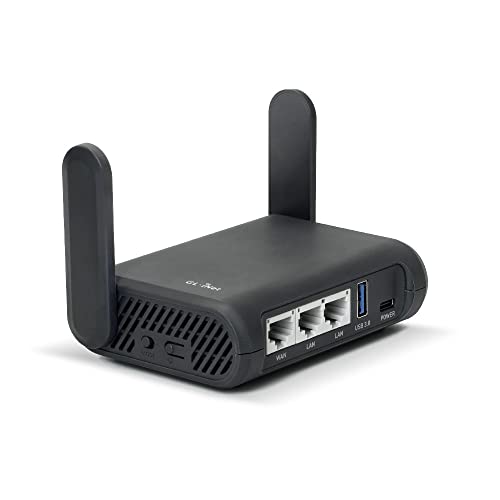
- Turns a wired or public wireless connection into a network shared by your own devices
- Includes WireGuard, OpenVPN, policy routing, and an optional VPN kill switch
- Runs OpenWrt and supports network storage, encrypted DNS, guest Wi-Fi, and AdGuard Home
If router coverage is essential, choose the provider and hardware together. A travel router can put several devices behind one compatible VPN profile, but it needs a service that actually supplies the required configuration. That hardware isn't a workaround for TunnelBear's missing router support.
Recent Complaints Point to the Test, Not the Verdict
The 20 newest detailed English-language TunnelBear reviews on Trustpilot visible on September 2, 2026 skewed critical. Rating-only entries were excluded. Some reviewers praised the simple setup and occasional-use connections; several others described failed connections, inaccessible sites, or frustrating changes after updates.
That's a snapshot of self-selected reviewers, not a representative measure of everyone using TunnelBear. It can't prove the failure rate. It can tell you which failures to reproduce before paying: reconnects, site access, and behavior after an app update.
Read the newest reviews for your exact operating system too. A Windows complaint doesn't diagnose the current iPhone app, and a broad brand score won't tell you whether one release fixed the problem you have.
Make the Bear Fail Before You Trust It
Use the free allowance for steps 1–4. TunnelBear's current plan page puts country selection and SplitBear on paid Unlimited accounts, so run steps 5–6 only after upgrading.
A second location can help distinguish a blocked shared exit address from a broken tunnel:
- Connect to the fastest nearby location and confirm the public IP changes.
- Check DNS, IPv4, IPv6, and WebRTC behavior with the tunnel active.
- Force a connection drop and verify that VigilantBear blocks traffic.
- Sleep and wake the device, then switch between Wi-Fi and cellular or a hotspot.
- Test two nearby countries and the sites you can't afford to lose: banking, email, work tools, and permitted media services.
- Add one SplitBear exception and confirm that only the intended app or site takes the direct route.
A VPN also can't protect an email account from a stolen password or a convincing phishing page. Use strong, unique credentials and phishing-resistant authentication where the account supports it. A hardware key can help with those accounts; it doesn't sign you into TunnelBear or validate TunnelBear's tunnel.
Start with the email address attached to your VPN account. If an attacker controls that inbox, they may be able to reset passwords, read support conversations, or change billing details without touching the encrypted tunnel. Add the strongest sign-in method the email provider supports, save recovery codes somewhere safe, and keep a tested spare before making a hardware key your only route back in.

- Connects through USB-C or NFC, covering many newer computers and compatible phones
- Adds a phishing-resistant physical check to passkeys and supported multi-factor logins
- Works without a battery, code display, or wireless pairing process
Install the app from TunnelBear's official download page or a verified app-store listing, then confirm the publisher. Don't trust an unofficial extension because it borrowed the bear.
TunnelBear is one of the easiest VPNs to understand. Its published policy and history of outside security work give that simplicity substance. But the missing router and TV support, platform-specific controls, and recent connection complaints make the decision wonderfully unbranded: if it survives your devices, networks, and failure tests, keep it. If it doesn't, the friendly map isn't the product you need.