
Surfshark vs. NordVPN: Unlimited Devices or Deeper Tools?
- The Basic Tunnel Ends in the Same Place
- Unlimited and Ten Are Household Math
- The App Names Hide Different Boundaries
- Two Hops Don't Create Twice the Privacy
- Restricted Networks Force Feature Tradeoffs
- Meshnet Is a Private Device Network, Not Another Exit
- The Two “No Logs” Stories Need Dates
- Filters Need Their Own Failure Test
- A Travel Router Makes Either Service Less Native
- User Reviews Turn Into Tests, Not Votes
- Choose the Network You Actually Need
Surfshark and NordVPN share a corporate group, not a tunnel. Surfshark removes the simultaneous-device ceiling. NordVPN stops at ten connections, then adds Meshnet and a deeper set of specialty routes. Same corporate roof, but different network decisions.
For one laptop on public Wi-Fi, the two services look similar. The choice becomes sharper when a household has fourteen devices, needs remote access to a home computer, or wants to know what “no logs” means in each current policy.
The Basic Tunnel Ends in the Same Place
Ana opens a laptop on airport Wi-Fi and connects Surfshark. Her device encrypts covered traffic to a Surfshark server. The airport sees that server connection, timing, and volume. Surfshark receives and forwards the request. The destination sees a Surfshark exit IP.
She repeats the trip through NordVPN. The device now encrypts traffic to a NordVPN server. The airport sees NordVPN instead. Nord receives and forwards the request. The destination sees a NordVPN exit IP.
In both cases, HTTPS still protects secure browser sessions beyond the VPN server. Neither provider removes cookies, signed-in accounts, browser fingerprints, or location permissions. The tunnel changes the route and visible public IP; it doesn't turn Ana into a new person.
That matched trip is why a feature count can mislead. Surfshark and NordVPN both solve the ordinary tunnel. The winner depends on what has to happen around it.

Unlimited and Ten Are Household Math
Surfshark currently allows unlimited simultaneous VPN connections for household use. NordVPN allows ten. Count phones, computers, tablets, televisions, and travel devices before treating either number as large or small.
Fourteen Surfshark apps can hold separate server, auto-connect, and bypass rules. That's flexibility, plus fourteen configurations to update and test. Unlimited slots don't manage themselves.
NordVPN says a compatible router consumes one connection slot while covering attached devices. That can stretch ten slots, but every device behind the router shares its network-level policy. Native-only features and per-app choices don't magically appear in router firmware.
The GL.iNet Flint 2 can run compatible WireGuard or OpenVPN profiles for either provider and cover a device-heavy home network. It's relevant when televisions and consoles need one gateway, not when a phone already has the better native app.

- Pairs Wi-Fi 6 and dual 2.5-gigabit ports with enough capacity for a device-heavy household
- Runs WireGuard and OpenVPN directly on the router so compatible devices can share one VPN policy
- Supports AdGuard Home and OpenWrt customization, with an initial firmware update recommended
Check current profile support, firmware, DNS handling, kill-switch behavior, and measured encrypted throughput before buying. One router can simplify the device count and enlarge the blast radius of one bad rule.
The App Names Hide Different Boundaries
Both services offer WireGuard-based paths and OpenVPN on appropriate platforms. Surfshark exposes WireGuard directly; NordVPN builds NordLynx around WireGuard. The available protocol list and feature combinations still vary by operating system.
Surfshark calls split tunneling Bypasser and documents app or website exclusions on supported clients. NordVPN offers app exclusions on some platforms and an Allowlist for ports or subnets on Linux. Those aren't the same boundary.
Suppose Ana excludes a bank. The bank connection leaves directly, so the local network and ISP see that separate route, neither VPN handles it, and the bank sees Ana's ordinary public IP. Covered apps remain in the tunnel and show the provider's exit IP.
The bank works because it was removed from VPN protection. Test the exact platform after reconnect, sleep, and updates. NordVPN currently documents a Windows split-DNS conflict for some excluded apps; a generic “supports split tunneling” table won't show that.
Two Hops Don't Create Twice the Privacy
Surfshark's Dynamic MultiHop lets Ana select entry and exit countries on supported apps. NordVPN's Double VPN uses available paired routes. Both add a second provider-controlled hop, but the amount of route choice differs.
With Surfshark, the airport sees the encrypted connection to the chosen entry; Surfshark carries it through the exit; the destination sees that exit IP. With Nord Double VPN, the airport sees Nord's first server; Nord carries traffic through the paired second server; the destination sees the second exit IP.
Both can add distance and latency. Neither hides Ana after she signs into an account, and neither protects a compromised laptop. Use a second hop because the threat model needs provider-internal separation—not because two map pins look twice as secure.
Surfshark's IP Rotator changes an exit address without exposing the home IP. Nord's Onion Over VPN sends traffic onward into the Tor network from a Nord server. Those solve different problems and carry different performance costs.
Restricted Networks Force Feature Tradeoffs
Surfshark's NoBorders looks for restricted networks and offers suitable routes. NordVPN is moving its Obfuscated Servers category to NordWhisper, a protocol designed to resemble regular web traffic on networks that block ordinary VPNs.
Neither feature grants permission to ignore workplace policy or local law. The network still sees an encrypted connection, timing, and volume, and may still identify or block the server.
Nord's post-quantum protection currently works only with NordLynx on listed apps. Its documentation says dedicated IP, OpenVPN, obfuscated servers, and Meshnet disable that mode. Surfshark's current protocol guide describes a post-quantum layer for app-based WireGuard but not manual configurations.
The exclusions are the useful part. Turn on the feature you need, then confirm the active protocol. A settings page full of switches doesn't mean every switch survives the connection.
Meshnet Is a Private Device Network, Not Another Exit
NordVPN's Meshnet links approved devices for remote access, file sharing, local-resource access, or traffic routing through a peer. That can matter more than unlimited commercial VPN exits if Ana needs her home computer from a trip.
Route through a trusted home computer and the airport sees the encrypted Meshnet connection to that peer. The home computer becomes the forwarding point and can observe traffic such as DNS queries. The destination sees the home's public IP, not a NordVPN server IP.
Permissions are the product. A peer allowed to route through Ana's device can place activity under her home IP. Local-network permission can expose printers, storage, and cameras behind that device. Grant remote access, file sharing, traffic routing, and LAN access separately, then remove old peers.
Surfshark doesn't offer a direct Meshnet equivalent in its VPN app. Unlimited connections cover more independent devices; they don't create the same private device-to-device network.
The Two “No Logs” Stories Need Dates
Surfshark's current privacy policy, updated August 27, 2026, says it doesn't retain visited IP addresses, browsing history, used bandwidth, network traffic, or visited websites. It also says VPN servers temporarily keep a user ID and/or source IP plus server-connection timestamps and delete them within 15 minutes after the session ends.
Surfshark's 2025 Deloitte assurance assessed the described infrastructure, configurations, procedures, and policy conformance at that point. It is useful evidence, not a time machine for policy wording added later.
NordVPN's no-logs documentation says it doesn't retain browsing or identifying connection records and describes a sixth independent assessment, performed in late 2025. The full current report is available to Nord account holders.
Read each report beside the policy it examined. Surfshark B.V. is based in the Netherlands; NordVPN operates from Panama. The companies announced a shared holding group in 2022 while saying their infrastructure and product development would remain separate. Corporate context identifies who needs scrutiny; it doesn't settle what either server records.
Filters Need Their Own Failure Test
Surfshark's CleanWeb and NordVPN's renamed protection tools use different capabilities across platforms to block selected ads, trackers, unsafe domains, and other threats. Nord's Scam, phishing, and malware protection—formerly Threat Protection Pro—adds broader checks on supported desktop builds without requiring an active VPN; its DNS-based Scam and phishing protection—formerly Threat Protection—generally needs a Nord server connection, except on mobile.
Neither replaces operating-system updates, strong authentication, cautious downloads, or a browser you maintain. A blocked site may be a useful warning or a false positive.
Establish the plain tunnel first. Add one filter. Open the work, bank, and media sites you actually use. If something fails, disable only that layer and repeat.
Then break the tunnel. Test the kill switch during a forced server change, sleep and wake, and Wi-Fi-to-cellular handoff. Run DNS and IP leak tests on every important platform. A clean laptop result doesn't clear the television.
A Travel Router Makes Either Service Less Native
A travel router can cover a streaming stick, console, or work kit that lacks the app you want. The GL.iNet Slate Plus accepts compatible WireGuard and OpenVPN profiles and can apply one travel-network policy.
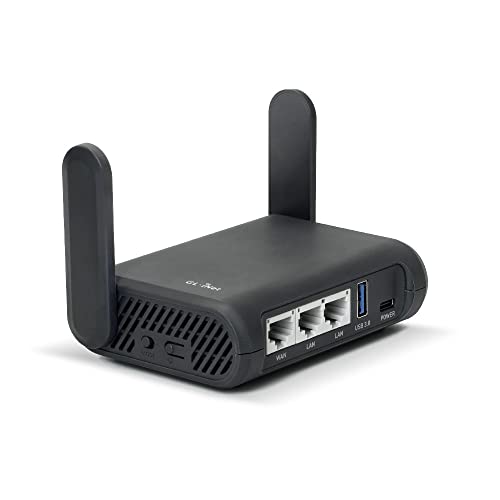
- Turns a wired or public wireless connection into a network shared by your own devices
- Includes WireGuard, OpenVPN, policy routing, and an optional VPN kill switch
- Runs OpenWrt and supports network storage, encrypted DNS, guest Wi-Fi, and AdGuard Home
That works with either provider only when the current manual profile and router firmware support the route. It doesn't carry every native feature. Finish hotel captive portals, use a unique admin password, update firmware, and test fail-closed behavior before leaving home.
With the router VPN active, the hotel sees one encrypted connection to Surfshark or NordVPN. The selected provider receives and forwards covered traffic. Destinations see its exit IP. Any bypass rule takes the ordinary hotel route instead.
User Reviews Turn Into Tests, Not Votes
This comparison uses the 20 newest detailed English-language Trustpilot reviews visible for each service on September 2, 2026 and excludes rating-only entries. Both samples are self-selected snapshots, not representative surveys.
Recent Surfshark reviews praise unlimited devices, setup, and helpful support. Critical reports mention connection drops, startup trouble, and television-interface changes.
Recent NordVPN reviews praise an approachable interface and persistent support. Critical reports mention update problems, blocked regional servers, and battery drain.
Reproduce the complaint on your hardware. Reboot Windows, wake the phone, navigate the television app, change networks, and ask support one technical question before the refund period ends. Reviews reveal friction. They can't verify server logging.
Choose the Network You Actually Need
Choose Surfshark when unlimited household connections, flexible MultiHop, Bypasser, NoBorders, and rotating IP solve named problems you'll test.
Choose NordVPN when ten slots are enough and Meshnet, Double VPN, Onion Over VPN, NordWhisper, or its longer assurance history earns a place in your setup. Remember that specialty modes can conflict.
Download only from the official Surfshark page or official NordVPN page. Test the same devices, nearby regions, calls, downloads, banks, and permitted media at comparable times. Don't choose either from a streaming chart that can expire tomorrow.
Surfshark wins the connection count. NordVPN wins the number of distinct network jobs. Your winner is the one whose extra jobs you can name, configure, and break on purpose.