
Surfshark Review: Unlimited Devices, Limited Assumptions
- One Café Connection Shows the Core Trade
- Unlimited Connections Solve a Household Problem
- The Protocol Menu Now Has Fine Print
- Bypasser Fixes One App by Exposing Its Route
- The Kill Switch Has to Survive a Real Failure
- The Current Policy Isn't “Nothing”
- CleanWeb and MultiHop Solve Narrower Problems
- A Travel Router Covers the Awkward Devices
- User Reviews Become a Failure Checklist
- Surfshark Wins on Reach Only If You Test the Edges
Surfshark removes the device limit, then gives you a harder limit to manage: attention. Phones, laptops, tablets, televisions, and routers can all connect. Unlimited slots don't tell you which apps fail closed, which traffic bypasses the tunnel, or what the provider retains.
That makes Surfshark a strong fit for a busy household, not an automatic privacy winner. Its current apps offer a wide set of routing and security controls. Its current policy also contains more detail than the old “no logs” shorthand. Both deserve a real test.
One Café Connection Shows the Core Trade
Leah opens a laptop on café Wi-Fi without a VPN. Her browser connects through the café and its internet provider to a website. HTTPS protects the secure session's contents, but the local route can still expose destination infrastructure, timing, and volume. The website sees the café's public IP.
Now she connects Surfshark. The app encrypts covered traffic to a Surfshark server. The café sees that server connection, timing, and volume, but not the final website carried inside the tunnel. Surfshark receives and forwards the request. The website sees Surfshark's exit IP.
The VPN hasn't erased trust. It has moved a powerful observation point from the café's provider to Surfshark. Cookies, account logins, browser fingerprints, and location permissions still follow Leah.
That's the product Surfshark has to prove: a reliable route through infrastructure it controls, backed by policy and evidence you can inspect.

Unlimited Connections Solve a Household Problem
Surfshark permits unlimited simultaneous VPN connections for personal use. A family doesn't have to disconnect a phone because someone turned on the television. That's genuinely useful when one account covers a messy mix of operating systems.
Unlimited isn't the same as managed. Every device still needs an official app or compatible manual profile, auto-connect rules, updates, and a tested failure response. A forgotten tablet with old software remains a forgotten tablet behind a VPN.
Make a device list before subscribing. Record the platform, owner, whether it leaves home, and whether it needs a native app. Surfshark's features vary by platform, so “supported” doesn't mean every switch appears on every screen.
For devices without a useful native client, a home router can hold a compatible VPN profile. The GL.iNet Flint 2 runs WireGuard and OpenVPN and can apply one network policy across televisions, consoles, and other household gear.

- Pairs Wi-Fi 6 and dual 2.5-gigabit ports with enough capacity for a device-heavy household
- Runs WireGuard and OpenVPN directly on the router so compatible devices can share one VPN policy
- Supports AdGuard Home and OpenWrt customization, with an initial firmware update recommended
That doesn't turn router firmware into the Surfshark app. Bypasser, CleanWeb behavior, and other native controls may not transfer to a manual profile. Check Surfshark's current router guide, update the router, measure encrypted throughput, and decide what happens if the tunnel drops.
The Protocol Menu Now Has Fine Print
Surfshark's current protocol guide lists WireGuard, OpenVPN, and IKEv2, with availability depending on the app. It also lists Dausos, a proprietary option currently limited to the macOS App Store build, and a post-quantum layer for app-based WireGuard rather than manual configurations.
Those names aren't a ranking. Start with the app's automatic choice or WireGuard on a supported device. If a network rejects the connection, change one protocol and repeat the same task. OpenVPN TCP may cross a network that resists another mode, but the extra compatibility can cost speed.
NoBorders addresses a related problem. Surfshark says it detects restricted networks and presents suitable server routes. It doesn't grant permission to ignore school, workplace, or local rules, and it can't hide traffic timing or the fact that a server connection exists.
Use the active connection screen as evidence. Check which protocol actually connected; don't assume the setting you tapped survived an app update or feature conflict.
Bypasser Fixes One App by Exposing Its Route
Surfshark calls its split-tunneling feature Bypasser. Leah can exclude a bank that rejects shared VPN addresses while leaving her browser in the tunnel.
The browser still travels through Surfshark. The café sees its encrypted server connection; Surfshark forwards the request; the website sees the VPN exit IP.
The bank app travels directly. The café and its provider see that separate bank connection. Surfshark doesn't carry it. The bank sees the café's public IP.
The bank works because Leah removed it from VPN protection. Keep the exception narrow, label it, and remove it when it stops being necessary. Excluding an entire browser to fix one site can send every tab down the ordinary route.
Test Bypasser after reconnecting, sleep and wake, and operating-system updates. App, website, and helper-process rules can behave differently.
The Kill Switch Has to Survive a Real Failure
A kill switch should block covered traffic when the VPN tunnel fails instead of allowing it to fall back silently. A settings-page toggle doesn't prove the transition works on Leah's device.
Start a harmless continuous connection, then force the VPN to change servers or lose its network. Check whether the protected app stops, whether an excluded Bypasser app continues, and whether the public IP appears during reconnection. Repeat after sleep, reboot, and a Wi-Fi-to-cellular handoff on mobile.
Run DNS and IP leak tests on every platform that matters. Test IPv4, IPv6, and WebRTC where relevant. A clean Windows result says nothing about the television app in the next room.
Auto-connect deserves the same treatment. It can reduce the chance that a family member forgets the VPN, but only if it starts early enough and recovers after real network changes.
The Current Policy Isn't “Nothing”
Surfshark's privacy policy, updated August 27, 2026, says it doesn't collect visited IP addresses, browsing history, used bandwidth, network traffic, or the websites users visit.
It also says VPN servers temporarily keep details about a connection to a specific server: a user ID and/or source IP plus VPN-server connection timestamps. The policy says that information is automatically deleted within 15 minutes after the session ends.
That's not a permanent browsing history. It also isn't zero connection data. The distinction matters because a source IP and timestamp occupy a different privacy category from a list of sites, yet can still identify a session while retained.
Surfshark's 2025 Deloitte assurance examined infrastructure, configurations, procedures, and policy conformance at the assessed point. The full report is available to users through Surfshark's Trust Center. It's useful evidence. It can't freeze policy language that changed later.
Read the report beside the current policy and note both dates. “Audited” isn't a lifetime tense.
Surfshark B.V. is based in the Netherlands. Surfshark says its 2022 merger with Nord Security created a shared holding group while the companies kept separate infrastructure and product development. Ownership identifies who deserves scrutiny; it doesn't answer what a server retains.
CleanWeb and MultiHop Solve Narrower Problems
CleanWeb blocks selected ads, trackers, phishing attempts, and malicious destinations on supported apps. It can reduce unwanted connections. It can't patch the device, inspect every threat, or replace strong account authentication and careful downloads.
Dynamic MultiHop lets users choose entry and exit countries on supported platforms. The café sees Leah's encrypted connection to the entry server. Surfshark carries traffic through the chosen exit. The destination sees the exit IP. Adding a hop can add latency and doesn't hide a signed-in account.
Static IP and rotating IP solve opposite address problems. A static option keeps a consistent shared exit. Rotating IP changes the exit address during a connection. Neither is a dedicated identity shield, and neither erases cookies.
Surfshark's wider plans can add Antivirus, Alert, Search, Alternative ID, and other tools. Each has separate permissions, inputs, retention, and failure modes. Buy a suite for tools you'll configure, not for a longer row of green checks.
A Travel Router Covers the Awkward Devices
A travel router can give a streaming stick, console, or work kit one controlled Wi-Fi network on the road. The GL.iNet Slate Plus accepts compatible WireGuard and OpenVPN profiles and includes policy-routing and optional kill-switch controls.
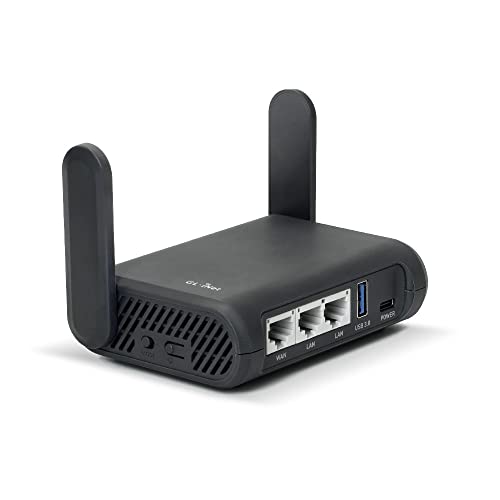
- Turns a wired or public wireless connection into a network shared by your own devices
- Includes WireGuard, OpenVPN, policy routing, and an optional VPN kill switch
- Runs OpenWrt and supports network storage, encrypted DNS, guest Wi-Fi, and AdGuard Home
It doesn't make hotel Wi-Fi trustworthy or add Surfshark's native app features. It moves the tunnel to the router. The hotel sees the router's encrypted connection to Surfshark; Surfshark forwards covered traffic; destinations see the exit IP. Any device or rule allowed outside the tunnel takes the ordinary hotel route instead.
Finish the captive portal before depending on the VPN, use a unique router admin password, update firmware, and test both the tunnel and failure mode at home. Don't make the first live trial in an airport queue.
User Reviews Become a Failure Checklist
This snapshot uses the 20 newest detailed English-language Trustpilot reviews visible on September 2, 2026 and excludes rating-only entries. These are self-selected reports, not a representative survey or privacy audit.
Recent Surfshark reviews praise easy setup, broad device use, helpful support, background reconnection, and stable everyday connections. Critical reports mention dropped connections, Windows startup trouble, confusing settings after app changes, and uneven Fire TV behavior.
Turn those complaints into tests. Reboot Windows. Wake the phone. Change Wi-Fi. Navigate the television app with the actual remote. Ask support one technical question before the refund period ends and save the answer.
Customer reviews can expose friction. They can't verify server logging, and an audit can't tell you whether Leah's Fire TV menu behaves.
Surfshark Wins on Reach Only If You Test the Edges
Download from the official Surfshark page or its verified store links. Avoid modified installers and third-party profiles.
Surfshark fits households that will use unlimited connections, broad platform support, Bypasser, NoBorders, and the optional security tools. Minimalists may find the growing bundle distracting; disable what you don't use and keep the connection state obvious.
The service can put a dozen devices on one encrypted route. It can't make a dozen untested configurations dependable. Count the devices. Read the current policy. Break the tunnel on purpose.
Unlimited connections are Surfshark's easiest promise. Knowing what every one of them does is the real review.