
Proton VPN Review: Strong Proof, Many Switches
- Start With the Route You Can Explain
- Open Code Helps; Repeated Checks Help More
- Secure Core Changes the Path, Not Your Identity
- Stealth Is for a Network That Blocks the Door
- Split Tunneling Creates Two Honest Answers
- A Kill Switch Earns Trust by Failing on Cue
- NetShield Stops Domains, Not Bad Decisions
- User Reviews Are Test Cases, Not Audit Results
- Proton VPN Rewards a Reason, Not More Switches
Proton VPN gives you a large control panel: Secure Core, NetShield, Stealth, split tunneling, several kill-switch modes. The clever move isn't turning everything on. It's knowing which switch changes which route.
For an ordinary café connection, the boring default may be the right one. For a blocked network or a higher-risk trip, one specialist feature can matter. Proton's appeal is that it offers both—and publishes more evidence than a promise on a pricing page.
Start With the Route You Can Explain
Maya opens her laptop on café Wi-Fi and connects to a nearby Proton VPN server. Her covered traffic enters an encrypted tunnel. The café sees a connection to Proton, plus its timing and volume, but not the individual destinations carried inside.
Proton receives the tunnel and forwards the requests. Websites see Proton's shared exit IP address instead of the café's public IP. HTTPS still protects secure browser sessions beyond the VPN server.
That's the baseline worth testing. Open the sites you actually use, join a call, download a real file, then run DNS and IP leak tests. A green Connect button can't tell you whether one app escaped or your work portal rejected the exit address.
Proton's current apps use Smart Protocol by default where it's supported. Let it choose first. If the connection fails, change one thing, reconnect, and repeat the same test. Otherwise, a protocol change, a new server, and an enabled filter can hide which move fixed—or broke—the route.

Open Code Helps; Repeated Checks Help More
Proton publishes its VPN client code and third-party app assessments. Public code gives researchers something concrete to inspect. It doesn't prove that every line was reviewed, that a distributed binary matches a particular commit, or that the live server configuration never changes.
The server-side evidence is stronger than a timeless “no logs” badge. Proton announced its fifth consecutive annual no-logs infrastructure audit in 2026. The published scope covers whether its production setup records browsing, DNS, destination, traffic, or user-identifiable connection metadata.
An audit answers questions about the systems, criteria, and period examined. It isn't a force field around tomorrow. Read the current privacy policy too, because account details, payment, support messages, and optional diagnostics aren't the same thing as VPN traffic logs.
Ownership is similarly specific. Proton VPN is operated by Proton AG in Switzerland. Proton says the nonprofit Proton Foundation is the primary shareholder and employees own most of the remainder. That structure tells you who controls the company; Swiss jurisdiction doesn't turn a weak system into a private one.
Secure Core Changes the Path, Not Your Identity
Now Maya enables Secure Core and chooses a New York exit through a hardened entry in Switzerland, Iceland, or Sweden. Her device still builds an encrypted route to Proton. The café sees the connection to the first Proton server. Proton carries the traffic through that entry and then a second exit server. The website sees the New York exit IP.
The extra hop reduces dependence on the exit server and its surrounding network. It also adds distance and usually adds latency. It doesn't hide Maya after she signs into an account, erase browser cookies, or make a compromised laptop safe.
Use Secure Core for a threat model that justifies the longer path. Don't leave it on because two server names look twice as private.
Proton still documents Tor over VPN as a paid specialist route, but its current product lifecycle marks the feature deprecated. Don't build a new workflow around a route scheduled to leave.
The same restraint applies to devices without a Proton app. A travel router such as the GL.iNet Slate Plus can carry a compatible WireGuard or OpenVPN client profile for several devices, but it can't reproduce every app-only Proton feature.
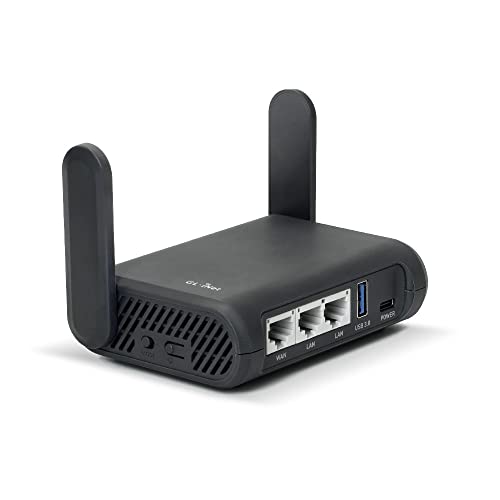
- Turns a wired or public wireless connection into a network shared by your own devices
- Includes WireGuard, OpenVPN, policy routing, and an optional VPN kill switch
- Runs OpenWrt and supports network storage, encrypted DNS, guest Wi-Fi, and AdGuard Home
With that setup, Maya's phone and laptop send traffic to the router; the router creates the VPN tunnel; the hotel network sees the tunnel; Proton forwards it; destinations see the VPN exit. A device that bypasses the router takes the hotel's ordinary route instead. Check current Proton plan, profile, firmware, DNS, kill-switch, and throughput support before buying hardware.
Stealth Is for a Network That Blocks the Door
Stealth is an obfuscated protocol built for networks that identify or block ordinary VPN connections. If standard WireGuard connects cleanly, Stealth isn't a privacy upgrade you must collect. If a school, workplace, ISP, or censor blocks the recognizable tunnel, it may help the connection look more like common HTTPS traffic.
That doesn't make the tunnel invisible. The local network may still infer that Maya is using an encrypted service from the server address, timing, volume, or later analysis. Proton still receives the tunnel, and signed-in destinations still recognize her account.
Platform details matter here. Proton's current protocol guide lists Stealth on Windows, macOS, Android, iOS, iPadOS, and Android TV. On the Linux graphical app, it currently depends on the Proton Protocols beta. OpenVPN is currently exposed in Proton's Linux GUI rather than every app. Don't buy a feature name; check the menu on the device you'll use.
On restricted networks, download and sign in before travel when lawful, keep an ordinary connection option, and understand the local rules. Disguising VPN traffic doesn't grant permission to bypass a network policy or local law.
Split Tunneling Creates Two Honest Answers
Suppose Maya's bank rejects Proton's shared IP. She excludes the banking browser and leaves her other apps covered.
The device sends the bank session directly while the other traffic stays in Proton's tunnel. The café and ISP see a direct bank connection plus the separate encrypted connection to Proton. Proton handles only the covered apps. The bank sees Maya's ordinary public IP; the other destinations see Proton's exit.
The bank works because Maya removed that browser from the VPN route.
That can be a sensible exception. It can also become a forgotten hole. Name the rule, record why it exists, and retest it after app or operating-system updates. If a local printer is the problem, allow the local connection instead of excluding an entire browser from the internet.
Proton's split-tunnel and kill-switch combinations vary by platform. Its current kill-switch guide says Windows supports the combination, while most other platforms don't. Treat the instructions for your exact operating system as the source of truth.
A Kill Switch Earns Trust by Failing on Cue
Leave an IP-check page refreshing. Switch servers, interrupt Wi-Fi, sleep and wake the laptop, then restart the app. Watch for Maya's ordinary public address between tunnels.
When the block holds, the device sends no new direct request, the café sees no fallback connection to the destination, Proton has no working session to forward, and the site receives nothing. When it fails open, the ordinary route returns; the café sees the direct connection and the site sees Maya's normal public IP.
Standard and advanced kill-switch modes don't mean the same thing, and the controls differ across Proton's apps. Test after a reboot and after changing split rules. A kill switch can protect covered traffic while deliberately excluded traffic continues outside it.
Test always-on reconnection separately: reboot, sleep and wake the device, then move between Wi-Fi and mobile data and confirm that the tunnel returns without a quiet direct gap.
NetShield Stops Domains, Not Bad Decisions
NetShield blocks requests to selected advertising, tracking, and malicious domains through Proton's DNS filtering. That can reduce unwanted connections and clean up a page. It can't inspect your judgment, remove a file you've already downloaded, or stop a convincing phishing form on an allowed domain.
If a site breaks, turn NetShield off briefly and reload before dismantling the whole VPN setup. That one-variable test tells you whether filtering caused the problem. Then choose whether the site is worth an exception.
A hardware security key can strengthen supported accounts with a phishing-resistant sign-in step. It solves the account problem, not the network-route problem.

- Connects through USB-C or NFC, covering many newer computers and compatible phones
- Adds a phishing-resistant physical check to passkeys and supported multi-factor logins
- Works without a battery, code display, or wireless pairing process
Check USB-C, NFC, browser, and account support before buying. Enroll a spare key or prove the recovery method before carrying the primary one. The key won't encrypt traffic, and Proton VPN won't rescue a weak account-recovery path.
User Reviews Are Test Cases, Not Audit Results
The 20 newest detailed English-language Trustpilot reviews visible on September 2, 2026 are a self-selected snapshot, not a representative survey. Proton VPN's Trustpilot page mixes plans, platforms, countries, and support cases.
Positive comments in that snapshot mention straightforward setup, a clean interface, useful privacy controls, and connections that work well for ordinary browsing. Critical reports mention slow or dropped connections, websites rejecting shared VPN addresses, app trouble, and delayed support when a problem becomes complicated.
Turn those reports into a test list. Try the bank. Reproduce sleep and wake. Check the browser extension rather than assuming it matches the desktop app. User sentiment can't verify server logging, and a technical audit can't tell you whether Maya's video call will stutter.
Proton VPN Rewards a Reason, Not More Switches
Proton VPN fits people who value inspectable apps, recurring infrastructure assessments, and specialist routes they can explain. Its free plan also offers unlimited data without a time cap, but the paid and free feature sets differ. Compare the current plan page with the devices and controls you need.
Download from Proton's official download page, verified app-store listings, or documented Linux repositories. Start nearby. Save a baseline. Break the connection on purpose. Add Secure Core, Stealth, split tunneling, or NetShield only when a specific problem asks for it.
The impressive part isn't how many routes Proton VPN can draw. It's whether you can tell which one your traffic took.