
Obfuscated VPN Servers: Stealth, Not Invisibility
The normal VPN won't connect on hotel Wi-Fi. You switch on “stealth,” and the tunnel opens. The hotel hasn't gone blind. Its filter has simply become less certain that the encrypted connection in front of it is a VPN.
That's obfuscation: changing recognizable tunnel patterns so a network has a harder time classifying and blocking them. The underlying VPN protocol still provides the encryption. Obfuscation changes the wrapper, transport, headers, timing, or other fingerprints around it.
Use it for an authorized connection that a restrictive network misclassifies or blocks. It isn't permission to evade workplace rules, school policy, service terms, or local law.
A Filter Doesn't Need to Read the Page
Picture a standard WireGuard connection. The device sends a recognizable UDP handshake and packets toward a known VPN server. The network operator may see the server IP address, port, timing, volume, and protocol-shaped traffic even though it can't read the protected payload.
The operator can block that server address. It can reject the port. A more capable system can inspect the opening exchange or packet patterns and classify the flow as WireGuard without decrypting the website inside it.
“Deep packet inspection” is often used as a catch-all label, but filters vary. One blocks UDP. Another maintains lists of VPN server addresses. Another looks for protocol signatures. Those are different obstacles and may need different responses.
Changing from WireGuard to OpenVPN over TCP can help when the first problem is blocked UDP. It doesn't automatically defeat a system that recognizes OpenVPN or blocks the destination server. A protocol change and obfuscation aren't the same operation.

Obfuscation Changes the Introduction
Now send the same protected request through an obfuscated transport.
The device still builds a secure tunnel or wraps an existing one according to the provider's design. The local network sees an encrypted connection to a remote endpoint plus timing and volume, but the opening exchange or packet shape may resemble allowed web traffic or lose the easiest VPN signature. The provider unwraps the disguise, terminates the VPN route, and forwards traffic. The website sees the VPN exit address.
Without obfuscation, the local network may confidently label and block the ordinary VPN pattern. With it, the same network may carry the flow because its classifier is less certain. In both cases, the provider knows it is operating a VPN connection and the website can still recognize the shared exit address.
Same encrypted request. A less obvious introduction—not invisibility.
There is no universal stealth standard. Providers use names such as obfuscated servers, camouflage, stealth, Mimic, NordWhisper, Lightweight WireGuard Obfuscation, QUIC transport, Shadowsocks, or UDP-over-TCP. The names don't promise the same construction, platforms, or resistance to filtering.

- Maps the many ways companies and governments collect data during ordinary online activity
- Makes large-scale surveillance understandable without requiring a technical background
- Helps readers question privacy promises and recognize the tradeoffs behind convenient services
Network classification is one part of a much larger surveillance picture. A changed packet pattern doesn't remove account records, device identifiers, browser tracking, payment trails, or legal demands made to the services you use.
Match the Method to the Block
Start with a normal nearby server. If it connects, obfuscation may add work without solving anything.
If the app fails, record the exact network, protocol, server, time, and error. Can ordinary HTTPS sites load? Does another nearby server work? Does a mobile hotspot work? Does switching from UDP to TCP change the result? One controlled change tells you more than five toggles.
A port block may yield to another allowed port. An outright UDP block may yield to a supported TCP-based transport, while a WireGuard-specific block may yield to QUIC obfuscation. Signature detection may require an actual obfuscation method. An IP-address block may survive every packet disguise because the destination itself is on the denylist.
Mullvad's current Android guide, for example, distinguishes WireGuard port choice from LWO, QUIC, Shadowsocks, and UDP-over-TCP. It also warns that these anti-censorship methods don't unblock websites and may increase battery or system use.
NordVPN is another reminder to read current documentation. Its current obfuscated-server migration notice says the category is moving from OpenVPN-based obfuscation to NordWhisper. An old tutorial that insists on one protocol can become wrong while the menu name stays the same.
Use the provider's maintained app and current platform guide. Don't import a mystery “stealth VPN” profile from a forum when the network is already telling you it cares about the connection.
The Network Still Sees a Connection
Obfuscation can make classification harder. It can't hide the fact that bytes travel between your device and a remote server.
The access network can still observe the endpoint address, connection timing, duration, and data volume. It may block long-lived encrypted flows, permit only approved destinations, require device management, or cut off anything that behaves unexpectedly. A filter can also learn new signatures or server addresses later.
The VPN provider still occupies the trust position after the first hop. It can operate the entry and exit, apply account limits, and handle the outgoing connection. Read its logging policy, audit scope, ownership, and legal jurisdiction just as you would for a standard server.
The destination still sees the VPN exit address. Cookies, signed-in accounts, browser fingerprints, and information you submit work normally. Obfuscation aimed at the hotel firewall doesn't make a bank or streaming service accept that exit.
Expect a Performance Bill
Wrapping or reshaping traffic can add processing, headers, retransmission, another transport, or another hop. The effect can be small on one nearby server and obvious on a distant or crowded route.
Measure the task, not only the peak. Compare connection time, page loads, calls, downloads, battery use, and sleep recovery with the normal protocol and the obfuscated one. Keep the server location and test window as similar as possible.
If both routes are slow, investigate the network, device, and server distance. If only obfuscation is slow, test another supported method or use the ordinary tunnel where it works. It can't create bandwidth the hotel never supplied.
Router Support Is a Separate Question
A travel router can share one ordinary WireGuard or OpenVPN profile with several devices. That doesn't prove it can reproduce a provider's app-only obfuscation.
With an app on the laptop, the laptop applies the provider's obfuscated transport before the hotel network sees the flow. With a router client, the laptop first talks across the local network and the router builds whatever protocol its firmware supports. The internet destination may receive the same VPN exit address, but only the app route is obfuscated unless the router supports that exact method.
Confirm firmware, provider configuration, protocol, captive-portal flow, DNS behavior, policy routes, and fail-closed rules before depending on a router.
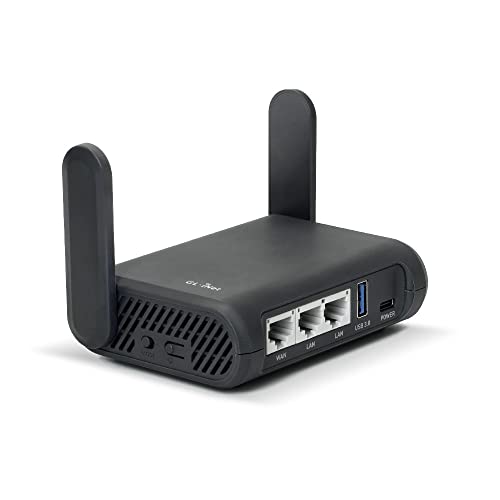
- Turns a wired or public wireless connection into a network shared by your own devices
- Includes WireGuard, OpenVPN, policy routing, and an optional VPN kill switch
- Runs OpenWrt and supports network storage, encrypted DNS, guest Wi-Fi, and AdGuard Home
A configurable travel router can make the shared route easier to inspect and recover, but don't buy it as a generic “stealth” switch. Test the precise profile and restriction at home, then test direct bypass so a failed gateway doesn't strand every device.
Make Failure Explicit
Turn on the kill switch if an unexpected direct fallback matters. Then break the obfuscated connection deliberately.
When blocking holds, the access network receives no new direct request to the website, the disconnected VPN endpoint receives no working session, and the website receives no fallback request from the normal public IP. When it fails open, the ordinary ISP route returns and the website sees that normal address.
Run a DNS leak test and an IP leak test after connecting, switching methods, sleep, wake, and failure. A stealth label says nothing about DNS or IPv6 coverage.
Before travel, keep the official installer, current instructions, approved server details, and support contact available offline. Confirm the laws and network rules where you'll connect. A technically successful tunnel can still violate a policy or law.
Use Stealth for One Named Obstacle
Obfuscation is a compatibility tool. Use it when a standard authorized VPN fails because a network classifies or blocks the tunnel, and stop using it when the ordinary route is clearer and faster.
The success test isn't “the icon turned green.” Name the filter you think you crossed, verify the public IP and DNS route, break the connection, and check what the network can still see.
The tunnel may look less like a VPN. It never stops being a connection someone else carries.