
NordVPN vs. PIA: Guided Tools or Raw Control?
- Follow One Request Through Both
- NordVPN Turns Complexity Into Features
- PIA Lets You Touch the Tunnel
- Split Tunneling Creates Two Honest Answers
- Unlimited Devices Still Share One Policy
- Compare Evidence With the Same Questions
- Break the Tunnel Before Choosing It
- User Reviews Are Bug Reports, Not Votes
- Pick the Interface Your Future Self Can Debug
NordVPN asks what you want to do. PIA asks how you want the tunnel built. Leave both on their defaults and either can protect ordinary traffic. Start changing ports, DNS, packet size, routes, or remote access, and the difference stops being cosmetic.
NordVPN wraps specialty routes, threat tools, Meshnet, and post-quantum protection in named features. Private Internet Access, or PIA, exposes more of the connection itself through open-source apps and detailed WireGuard, OpenVPN, DNS, port, and automation controls.
Choose guided breadth or deliberate control. Just don't confuse more switches with more privacy.
Follow One Request Through Both
Open a bank page with no VPN. The local network and ISP carry the direct connection, and the bank sees the household public IP address alongside its own login, cookies, and device signals.
Connect NordVPN. The local network and ISP see an encrypted connection to a NordVPN server plus timing and volume. NordVPN becomes the intermediary at the far end, and the bank sees a shared NordVPN address while its account signals remain.
Connect PIA instead. The local network and ISP now see the PIA server connection, PIA occupies the intermediary position, and the bank sees a PIA address. The observer roles don't change. The provider, server, settings, policy, and acceptance of that exit address do.
Neither provider makes the signed-in bank forget who you are.

NordVPN Turns Complexity Into Features
NordLynx, NordVPN's WireGuard-based protocol, is the natural default for many everyday connections. OpenVPN remains available. Obfuscated servers and NordWhisper address networks that identify or block ordinary VPN traffic, while optional post-quantum protection works through NordLynx on supported apps.
Double VPN, Onion Over VPN, and Meshnet do different jobs. Double VPN adds a second NordVPN server. Onion Over VPN passes traffic into Tor after a NordVPN entry. Meshnet links approved devices for remote access, file sharing, or routing through a trusted peer.
With ordinary NordVPN, the ISP sees the NordVPN entry and the destination sees the VPN exit. With Double VPN, the ISP still sees the first NordVPN server, that server forwards to a second, and the destination sees the second address. With Meshnet traffic routing, the approved host can become the exit and trust point, and the destination may see that host's public address.
The labels save setup work. They don't remove the need to understand who operates the next hop.
Threat Protection features can block selected malicious sites, trackers, ads, or risky downloads depending on platform and plan. A filtering module needs enough visibility into the request or file it evaluates, so read its permissions separately from the tunnel's privacy policy.

- Examines privacy as a full system involving accounts, devices, communications, travel, and records
- Goes well beyond choosing a VPN for readers who want a more deliberate privacy lifestyle
- Best treated as an advanced reference whose recommendations can be adapted to your actual risks
A VPN choice sits inside a wider privacy system involving accounts, browsers, devices, payments, records, and physical access. NordVPN's extra modules may cover more pieces. They don't cover the whole map.
PIA Lets You Touch the Tunnel
PIA's desktop app exposes WireGuard and OpenVPN plus protocol-specific choices. Current documentation covers OpenVPN transport, encryption level, remote port, packet size, and virtual network driver; WireGuard exposes timeout and packet-size controls. Its network settings offer PIA DNS, a local resolver, an existing resolver, or a custom resolver.
That's real control, and it creates real failure modes. Change three settings at once and you may never learn whether the blocked network needed TCP, a different port, or smaller packets. Keep a baseline, change one variable, and know how to reset the app.
Suppose PIA DNS is selected. The app should route domain lookups according to that policy, PIA's resolver receives them, and the ISP shouldn't receive those covered DNS requests directly. Choose “Use Existing DNS,” and the selected outside resolver may receive them instead; the exact network path and ISP visibility depend on whether those queries remain inside the tunnel. A DNS label isn't proof—test it.
PIA also offers MACE, multihop, split tunneling, port forwarding in selected regions, and network automation on supported apps. Availability differs by platform. An iPhone menu and a Linux desktop window shouldn't be treated as the same product because the subscription is shared.
WireGuard versus OpenVPN is a starting choice, not a winner's medal. The app still has to survive sleep, network changes, DNS, IPv6, tunnel failure, and the restrictions of the network underneath it.
Split Tunneling Creates Two Honest Answers
Suppose the browser uses the VPN while a game is excluded.
For the browser, the local network and ISP see the chosen VPN server, that provider handles the traffic, and the website sees a VPN address. For the game, the local network and ISP resume the direct route, the VPN receives nothing from that request, and the game service sees the household IP address.
The VPN status icon can be true for one application and irrelevant to another.
Both providers offer split-tunneling controls on selected platforms, but the direction and supported app types can differ. Include launchers, updaters, browser handoffs, anti-cheat components, and helper processes in the test. Excluding one executable may not exclude the whole task.
A compatible hardware key can protect the email or password-manager account used for VPN recovery. It can't repair a split route or verify a provider's logging behavior. Check current account-authentication support before assuming the key works directly with either VPN account.
Unlimited Devices Still Share One Policy
PIA's current subscription policy allows unlimited simultaneous connections. That suits a device-heavy household, but it doesn't make every device compatible or every route intentional.
NordVPN currently allows ten simultaneous connections and documents special same-server protocol conditions. Its support page says a configured router uses one slot while covering devices behind it.
Either provider can supply manual configurations for compatible routers. The router becomes the enforcement point: a laptop sends traffic across the LAN, the router creates the VPN tunnel, and the destination sees the provider's address. With a device app, the laptop creates the tunnel before the home router sees the covered request. Same possible website IP. Different starting point and controls.
Confirm the exact router firmware, provider configuration, protocol, DNS behavior, policy routing, encrypted throughput, and fail-closed rule. “VPN passthrough” only lets a client tunnel cross the router; it doesn't make the router a VPN client.

- Pairs Wi-Fi 6 and dual 2.5-gigabit ports with enough capacity for a device-heavy household
- Runs WireGuard and OpenVPN directly on the router so compatible devices can share one VPN policy
- Supports AdGuard Home and OpenWrt customization, with an initial firmware update recommended
A VPN-capable router can extend either service to boxes without native apps, but it won't reproduce Meshnet, PIA's desktop controls, or every filtering feature. Decide which routes belong at the network edge and which need an app on the device.
Compare Evidence With the Same Questions
NordVPN's no-logs documentation says it doesn't retain browsing or identifying VPN connection activity. The company announced its sixth assurance assessment for late 2025, covering standard and specialty server types; full report access requires a Nord Account.
PIA's 2025 Deloitte review was its third independent assurance engagement. The PIA audit announcement says it examined VPN configurations, management systems, and token-based dedicated-IP technology against the no-logs policy, and links the report publicly.
PIA also publishes quarterly transparency reports describing legal demands and its stated responses. Those reports are provider disclosures; they add a different evidence type, not independent proof of every line in the policy.
Ask both providers the same questions. What systems and dates did the assessment cover? Could the auditor inspect production configuration? What data categories were tested? What findings and exceptions appeared? Were fixes retested? Can you read the full report before buying?
NordVPN says it operates under Panamanian jurisdiction and is owned by Nord Security. US-based PIA belongs to Kape Technologies. Jurisdiction and ownership tell you which rules and corporate actors to examine; they don't substitute for examining system design and retained data.
Break the Tunnel Before Choosing It
Connect with default settings first. Verify the public IP and DNS route, then interrupt the tunnel while a harmless request repeats. Disable Wi-Fi, switch networks, sleep the device, wake it, change servers, quit the app, and reboot with automatic connection enabled.
When the kill switch holds, the access network receives no new direct destination request, the failed VPN server receives no working session, and the destination doesn't see the household IP. When it fails open, the ordinary ISP route returns and the destination sees that household address.
PIA exposes several failure and automation controls; NordVPN packages more behavior behind named modes. Read what each setting promises on that operating system, then test exactly that boundary. Persistent blocking and “block after an active tunnel drops” aren't the same rule.
Use the DNS leak test and the IP leak test after connection, server change, sleep, and failure. A clean screenshot taken once doesn't prove transition safety.
When several travel devices share one hotel connection, a travel router can make the common route easier to inspect.
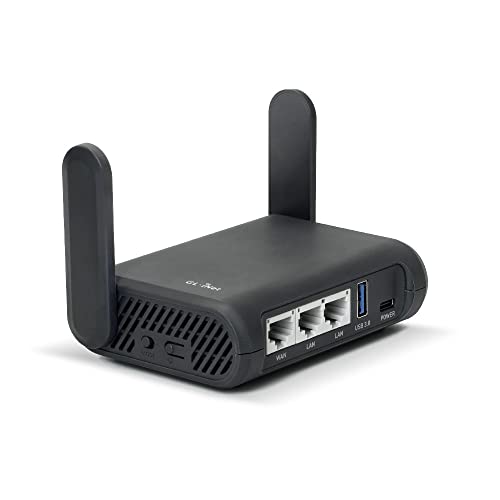
- Turns a wired or public wireless connection into a network shared by your own devices
- Includes WireGuard, OpenVPN, policy routing, and an optional VPN kill switch
- Runs OpenWrt and supports network storage, encrypted DNS, guest Wi-Fi, and AdGuard Home
It also creates another place where a stale profile, captive portal, DNS rule, or failed tunnel can strand every device, so rehearse direct bypass and recovery before the trip.
User Reviews Are Bug Reports, Not Votes
The original comparison sampled the 20 newest detailed English-language Trustpilot posts visible for each provider on September 2, 2026 and excluded rating-only entries. The samples are self-selected, not representative.
Recent NordVPN reviews in that snapshot praised easy setup, stable use, and persistent support. Critical reports mentioned app-update trouble, rejected regional servers, and occasional mobile battery use.
Recent PIA reviews praised long-term reliability, control, and support. Critical posts described blocked shared addresses, connection problems after changes, and slow resolution of account issues.
Recreate the themes that matter. Run a long call, leave the phone connected for a day, open banks and work tools, test permitted media, sleep the laptop, and reboot it. Ask each support team one specific platform question and compare whether the answer names the setting, route, and privacy tradeoff.
Pick the Interface Your Future Self Can Debug
Choose NordVPN when you want Meshnet, specialty routes, threat tools, and future-facing options presented as guided features.
Choose PIA when unlimited connections, open-source clients, manual profiles, and detailed control over protocols, DNS, ports, and automation are the point—not knobs you'll never touch.
Download from the official NordVPN page or official PIA page. Start with defaults. The better VPN is the one you can still explain after the network changes and the green light lies.