
NordVPN vs. ExpressVPN: Test the Failure
NordVPN and ExpressVPN both put a large Connect button in front of you. The real choice appears after you press it. One service keeps offering another tool to configure; the other keeps pulling you toward a smaller set of defaults and a router-centered path. Neither approach wins until it survives your devices, websites, and broken connections.
Both services can encrypt covered traffic to a VPN server, reduce what the local network and ISP see, and replace the public IP address a website receives. Neither can erase account logins, browser fingerprints, phishing, or every block aimed at shared VPN addresses.
Choose NordVPN when you'll use its specialty routes, Meshnet, threat tools, or post-quantum option. Choose ExpressVPN when you value Lightway, consistent core controls, and a stronger first-party route for protecting a household from the router. Then test that theory instead of buying the label.
Start With the Same Request
Open a bank page without either VPN. The local network and ISP carry the direct connection, and the bank sees the household IP address alongside its own cookies, login, and device signals.
Connect NordVPN. The local network and ISP see an encrypted connection to a NordVPN server plus timing and volume. NordVPN becomes the intermediary at the far end, and the bank sees the NordVPN server's shared address while its account and device signals remain.
Connect ExpressVPN instead. The local network and ISP now see the ExpressVPN server connection, ExpressVPN occupies the intermediary position, and the bank sees an ExpressVPN address. The observer roles are the same. The provider, implementation, exit address, and policy evidence change.
That's the comparison. Not two logos racing across a speed-test dial.

NordVPN Gives You More Levers
NordLynx, NordVPN's WireGuard-based protocol, is the sensible default for many everyday connections, while OpenVPN remains available on supported apps. Its optional post-quantum protection works through NordLynx on supported apps. Obfuscated servers address networks that identify or block ordinary VPN traffic, while Double VPN and Onion Over VPN deliberately change the route for narrower needs.
Threat Protection features can block selected malicious sites, trackers, ads, or risky downloads depending on the app and subscription. Meshnet links approved devices for private access, file sharing, or routing through another device.
Those features aren't one privacy shield. A threat filter needs visibility into the requests or files it evaluates. A Meshnet host becomes a route and trust point for the client. A second VPN hop changes the path but doesn't remove cookies from the final website.
NordVPN currently allows ten simultaneous connections, with additional same-server protocol conditions described on its official device-limit page. Count phones, computers, televisions, and always-on boxes before assuming ten is generous.
ExpressVPN Narrows the VPN Core
Lightway is ExpressVPN's open-source protocol and the default family its apps commonly favor. The current implementation is written in Rust, uses wolfSSL, and has published third-party assessments. ExpressVPN also offers WireGuard, OpenVPN, and other choices on supported platforms, so “simple” doesn't mean “one protocol.”
Network Lock is ExpressVPN's kill switch. Split tunneling, automatic connection, threat filtering, and local-network access depend on platform and subscription. The interface may expose fewer specialty routes than NordVPN, but you still need to inspect each device instead of assuming feature parity.
ExpressVPN's router software is the distinctive path. A compatible router can group household devices and apply different VPN locations or direct routes at the network edge. That's useful for televisions and consoles without full VPN apps, but it also moves enforcement away from the endpoint.
On a device app, the laptop encrypts covered traffic before the home router sees it; the router forwards the tunnel, and the website sees the VPN address. On a router VPN, the laptop first sends the request across the LAN; the router builds the tunnel, and the website may see the same VPN address. Same destination result. Different place where protection begins.
Protocol names don't decide the winner. The app still has to handle DNS, IPv6, sleep, network changes, split routes, and tunnel failure around that protocol.
Count Devices by the Plan You'd Actually Buy
ExpressVPN's current simultaneous-connection page lists 10 devices for Basic, 12 for Advanced, and 14 for Express Pro. A router counts as one connection under its examples while covering devices behind it.
NordVPN lists ten connections for one account and says a configured router uses one slot while covering its attached network. In both cases, router coverage doesn't make every device individually controllable. A printer, work laptop, television, and child's tablet may need different routes.
Draw the groups before buying hardware. Which devices must use the VPN? Which need the household address? Which need local discovery? Which must never fall back to a direct route?

- Pairs Wi-Fi 6 and dual 2.5-gigabit ports with enough capacity for a device-heavy household
- Runs WireGuard and OpenVPN directly on the router so compatible devices can share one VPN policy
- Supports AdGuard Home and OpenWrt customization, with an initial firmware update recommended
A third-party VPN-capable router can run compatible provider profiles, but it won't reproduce every app feature. Confirm the exact firmware, supported protocol, policy routing, DNS behavior, encrypted throughput, and fail-closed rule. A “VPN passthrough” label only means client traffic can cross the router; it doesn't mean the router creates a tunnel.
ExpressVPN's first-party router path may reduce integration work. NordVPN's broader manual-router ecosystem may give you more hardware choice. The better answer depends on the box, not the provider's router illustration.
Read Audits by Scope, Not Count
NordVPN's no-logs documentation says it doesn't retain browsing or identifying VPN connection activity. The company announced a sixth independent no-logs assurance assessment for late 2025; customers need a Nord Account to read the full report.
NordVPN also describes its server network as RAM-only, so its VPN-server environment is designed not to persist data through a reboot. That architecture narrows one storage risk; it doesn't replace scrutiny of software, operations, or the audit scope.
ExpressVPN's privacy policy says it doesn't log browsing history, traffic destinations, data content, DNS queries, source IP addresses, assigned VPN IP addresses, connection timestamps, or session duration. It separately discloses limited account, diagnostic, and successful-connection data.
Its Trust Center links or summarizes reviews of privacy commitments, Lightway, TrustedServer, apps, browser extensions, and routers. TrustedServer runs the VPN environment in RAM and reloads a controlled image at reboot.
One broad assurance report and five narrow code reviews aren't six versions of the same proof. Check the date, system, version, test period, access to the report, findings, and remediation. “Audited” without scope is marketing shorthand.
Break the Tunnel on Purpose
Connect each app, verify its public IP and DNS route, then interrupt the tunnel while a harmless page refreshes. Disable Wi-Fi, switch to mobile data or Ethernet, sleep the device, wake it, change servers, and restart the app.
When the kill switch holds, the access network doesn't receive a new direct connection to the destination, the disconnected VPN server receives no working session, and the destination receives no fallback request from the household IP. When it fails open, the ordinary ISP route returns and the destination sees that household address.
Repeat the test under the exact mode you'll use. A kill switch that activates only after one successful connection answers a different question from a persistent setting that blocks traffic whenever the app is disconnected.
Also test split tunneling. For a covered app, the ISP sees the VPN endpoint, the chosen provider handles the traffic, and the destination sees its VPN address. For an excluded app, the ISP resumes the direct route, the VPN receives nothing from that request, and the destination sees the household address.
Use the DNS leak test and the IP leak test after connection, server change, sleep, and failure. A clean first screenshot doesn't test recovery.
User Reports Tell You What to Reproduce
For an even snapshot, the original review sampled the 20 newest detailed English-language Trustpilot posts visible for each provider on September 2, 2026 and excluded rating-only entries. These are self-selected anecdotes, not representative surveys.
Recent NordVPN reviews in that sample praised ease of use, stable connections, and persistent support. Critical themes included trouble after updates, blocked regional servers, and battery use on selected mobile devices.
Recent ExpressVPN reviews praised intuitive apps and low-effort daily use. Complaints included intermittent drops, manual restarts, and sites refusing VPN connections.
Turn every theme into a test. Run a long call, leave the phone connected for a day, open essential banks and work tools, visit permitted media services, sleep the laptop, and reboot it. Ask support one exact platform question—such as keeping a printer local while a browser stays covered—and compare the specificity of the answers.
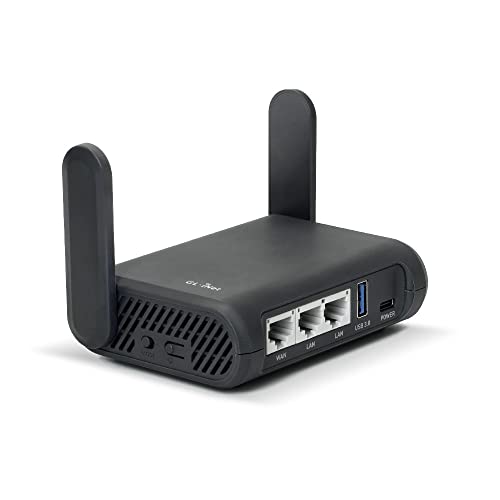
- Turns a wired or public wireless connection into a network shared by your own devices
- Includes WireGuard, OpenVPN, policy routing, and an optional VPN kill switch
- Runs OpenWrt and supports network storage, encrypted DNS, guest Wi-Fi, and AdGuard Home
A travel router can put multiple devices behind one chosen profile, but captive portals and hotel restrictions add another failure point. Practice direct bypass, portal sign-in, profile removal, DNS checks, and recovery at home before the router becomes the only path in your bag.
Choose the Failure You Can Explain
Pick NordVPN if you'll actually configure its extra tools and can explain which traffic each one sees. Pick ExpressVPN if its Lightway defaults and router path remove decisions you don't want to make.
Download from the official NordVPN page or official ExpressVPN page. Test the phone and computer you own, not the benchmarker's clean machine.
The winner isn't the app that connects fastest once. It's the one whose route still makes sense after Wi-Fi changes, a website objects, and the tunnel disappears.